
To use Jev AI, give it relevant information, define a question with specific possible answers, and let your application decide what to do with the result. For a trader, a useful starting point is interpreting a research request before considering automated trading.
Table of Contents
- What Is Jev AI?
- What do you give Jev?
- Which question types does Jev support?
- How Do You Use Jev AI for the First Time?
- Use Jev AI in the official Playground first
- Move to the API when you need repeatable tests
- How Could Traders Use Jev AI?
- What Does Jev Return for an NVDA–SPY Request?
- The actual request
- The actual displayed response
- How to interpret it
- Mistakes a beginner could make
- Try your own version
- How Do You Test Jev Before Real Execution?
- Step 1: Verify the research assistant separately
- Step 2: Define the trading experiment in advance
- Step 3: Supply only information available at the decision time
- Step 4: Record decisions without submitting orders
- Step 5: Enforce independent controls
- Step 6: Automate a Tradovate demo account with PickMyTrade
- Step 7: Evaluate on data you did not tune against
- Where Does PickMyTrade Fit?
- What does the proposed architecture look like?
- How do webhook limits and duplicate alerts affect a custom receiver?
- Frequently Asked Questions
- The Short Version
This guide uses TypeSafe’s recorded trading-assistant example, then develops a proposed paper-trading workflow. Understanding a request and identifying a profitable trade require different tests. Model versions and pricing were last reviewed on September 23, 2026.
The execution half of the experiment is covered elsewhere on this blog. Our guide to paper trading a TradingView strategy on Tradovate covers the connection, and our test plan for Tradovate demo trading covers what about 10 sessions can and can’t prove. This post covers the Jev side: what to send, what comes back, and how to test it before any order is placed.
Key Takeaways
- Jev is TypeSafe AI’s first System One model, introduced on September 15, 2026. You send it state and questions, and it returns structured answers your code can use.
- In TypeSafe’s recorded example, the request “plot rolling correlation between nvda and spy for the past month” produced a call with confidence 0.91. That number reflects how certain the model was about reading the request, not whether a trade would win.
- Test in stages: check the assistant’s interpretations first, then paper-trade a fixed strategy with and without a Jev filter, using only information available at decision time.
- The documented execution path is TradingView alert → PickMyTrade → Tradovate demo account. A native Jev–PickMyTrade connector was not verified.
What Is Jev AI?
Jev is TypeSafe AI’s first System One model, introduced on September 15, 2026. It is designed to return structured decisions that software can use directly, rather than generate an open-ended written answer. TypeSafe’s launch announcement
What do you give Jev?
You provide two things:
- State: the information to evaluate, such as a trader’s request or a structured record.
- Questions: the decisions you want answered, with instructions and, where applicable, allowed answers.
State can be text, a JSON object, or an array of text-based values. The documented interface accepts text-based input; it does not directly read chart screenshots. State documentation
Which question types does Jev support?
Jev supports three question types:
| Type | What it returns | Possible trading-related use |
|---|---|---|
| Choice | One defined option, option probabilities, and confidence | Select which research function a trader requested |
| Score | A value across an ordered rubric, with probabilities and confidence | Rate a supplied note against a defined review checklist |
| Noul | A number from 0 to 1 representing the model’s probability of “yes” | Judge whether a supplied announcement concerns a specified company |
These are interface capabilities, not evidence that the suggested trading applications work reliably. Each application needs its own evaluation. TypeSafe API reference
How Do You Use Jev AI for the First Time?
Use Jev AI in the official Playground first
- Open the TypeSafe Playground and sign in.
- Enter a short, clear state.
- Add one question and define its allowed answers.
- Run it and inspect the returned values.
- Repeat with ambiguous requests and missing information.
For an initial exercise, classify whether a trading note requests a chart, a comparison, or something else. Include an option for requests outside those categories. TypeSafe documents this browser workflow and recommends an additional option when a Choice’s categories may not cover the input. Quick start, Choice documentation
Move to the API when you need repeatable tests
Create an API key in the TypeSafe console. The direct endpoint is:
POST https://api.typesafe.ai/v1/systemone
Authorization: Bearer <YOUR_TYPESAFE_API_KEY>
Content-Type: application/json
Requests contain state, model, and questions; responses contain answers, the actual model identifier, and token usage. Keep the key on your server. API reference
The official Python SDK requires Python 3.10 or newer:
pip install typesafe-sdk
Its client can read the TYPESAFE_API_KEY environment variable. Python setup
At the time of review, jev-latest points to jev-1.13.0. For comparable experiments, pin a model version and save the version returned by every call: an alias can change when a new release arrives. Current models
How Could Traders Use Jev AI?
Before you use Jev AI on real decisions, separate demonstrated behavior from ideas that still need testing:
| Application | Evidence status | What it establishes |
|---|---|---|
| Turn a research request into a predefined analysis call | Documented vendor example | TypeSafe publishes commands and their selected functions |
| Use Jev inside a paper-trading engine | Community implementation | Public code shows an integration, not proven profitability |
| Filter strategy signals using supplied context | Proposed experiment | Requires comparison against the same strategy without Jev |
| Predict consistently profitable entries | Unverified | The sources reviewed do not establish this ability |
Sources: TypeSafe trading-assistant cookbook, Jev-Trades source code.
One community implementation calls TypeSafe’s API and applies separate Python rules to a simulated account. That is a useful architectural example: receiving a model answer and executing an order are different operations. It is not a trading recommendation or an audited performance record.
For a first project, choose something you can verify directly: did Jev select the intended tool and interpret the requested parameters correctly?
What Does Jev Return for an NVDA–SPY Request?
Suppose you are researching a possible NVDA trade and want to examine its relationship with SPY before making a decision.

Evidence status: TypeSafe published this recorded example using jev-1.12; its page replays cached answers. This article did not independently execute that API request. Original example
The actual request
plot rolling correlation between nvda and spy for the past month
The actual displayed response
rolling_correlation(symbol='NVDA', benchmark='SPY', window='1mo')
confidence 0.91   tool 1.00
This is the application’s printed selection, not the raw HTTP response. Separate analysis code runs against supplied market data. Recorded request and output
How to interpret it
| Part | Meaning |
|---|---|
rolling_correlation | The selected analysis function |
symbol='NVDA' | The instrument being examined |
benchmark='SPY' | The comparison instrument |
window='1mo' | The requested historical period |
confidence 0.91 | The least certain judgement behind the call, as the cookbook defines it |
tool 1.00 | The displayed probability for the selected tool |
Neither number is a correlation coefficient, a price forecast, or a trade’s win probability. They concern the interpretation of the request. More generally, TypeSafe derives Choice and Score confidence from their answer distributions. Confidence documentation
Before using any resulting chart, check the analysis function’s definition: which observations it compares, how timestamps align, how missing values are handled, and what calculation window it uses. A correctly selected function can still produce misleading analysis if its data or implementation is unsuitable.
Mistakes a beginner could make
- Read the response as “buy NVDA.” No entry, exit, size, or order is specified.
- Treat 0.91 as a 91% chance of profit. The question concerns an analysis request, not a future trade outcome.
- Assume Jev supplied current prices. A model selecting an analysis function does not establish where that function’s data came from or how fresh it is.
- Expect identical output from a different model or question set. Save both when comparing runs.
Try your own version
To use Jev AI on your own commands, open the Playground link in the official cookbook. Inspect the configuration before running it; changing the model or questions creates a new test.
For your own assistant, add an explicit review path for unsupported symbols, unclear periods, or uncertain interpretations. Do not quietly convert an ambiguous research request into an order.
How Do You Test Jev Before Real Execution?
Paper trading means simulating orders without committing real money. For the futures execution test in this guide, we recommend a Tradovate demo account connected to PickMyTrade. PickMyTrade documents support for automating TradingView alerts on Tradovate simulation accounts. Tradovate demo automation guide
Tradovate currently advertises a two-week demo with $50,000 in simulated funds and real-time futures market data. Simulated results can differ from live trading. Official Tradovate trial, Simulation details
The earlier NVDA–SPY example is a research demonstration. This execution test uses a supported futures contract; it does not place NVDA or SPY stock orders through Tradovate.
The following is a proposed testing workflow, not a tested Jev strategy.
Step 1: Verify the research assistant separately
Create a small evaluation set of commands with expected functions and parameters. Include clear requests, unsupported instruments, missing periods, and requests for actions the application cannot perform.
Record whether each interpretation is correct and whether uncertain requests reach review. Do not measure this task using trading profits: its job is understanding a request.
Step 2: Define the trading experiment in advance
If you want to explore Jev as a signal filter, start with an existing, fully specified strategy. Write down its entry, exit, position-sizing, and trading-hours rules before introducing Jev.
Define Jev’s narrow role. For example, it could classify supplied context as suitable for further review, unsuitable, or insufficient. Whether that classification improves trading outcomes remains a hypothesis.
Run two paper versions on the same candidate signals: the original strategy and the strategy with the proposed filter. This comparison helps isolate what the filter changes.
Step 3: Supply only information available at the decision time
Save the market snapshot, its source, timestamps, completed bars, relevant text, and current simulated positions. Exclude later prices and later news. Using information from the future would invalidate a historical test.
Calculate indicators, order quantities, and risk limits in ordinary code. TypeSafe explicitly documents weaknesses with numerical precision and date comparisons. Jev’s documented limitations
Step 4: Record decisions without submitting orders
Begin in an observation-only mode. Store:
- The complete request, raw response, model version, and question version.
- Data timestamps and request duration.
- Jev’s selected answer, probabilities, and available confidence.
- The application’s final decision, including any override or rejection.
Preserve skipped opportunities and failures as well as accepted signals. Otherwise, the log cannot explain how the system behaves across all candidates.

Step 5: Enforce independent controls
Before permitting a simulated entry, require current data, a supported symbol, an allowed session, an acceptable position size, and an unused signal identifier.
An API error, stale response, or unresolved position mismatch should block a new entry. Protective exits need their own tested handling; they should not depend on Jev being available.
Choose confidence thresholds using your evaluation data. A threshold such as 0.80 or 0.90 has no universal trading meaning. TypeSafe also advises testing thresholds against the specific task. Confidence guidance
Step 6: Automate a Tradovate demo account with PickMyTrade
- Create a Tradovate demo account and select Simulation when signing in.
- Open PickMyTrade, connect your Tradovate account, and select Demo mode.
- Configure an alert for a supported futures contract and confirm the destination is your simulation account.
- Copy the generated alert message and webhook URL into a TradingView alert. Use a TradingView plan that supports webhooks.
- Trigger a controlled test, then check the PickMyTrade logs and Tradovate simulation account. Verify the contract, order direction, quantity, and exit behavior.
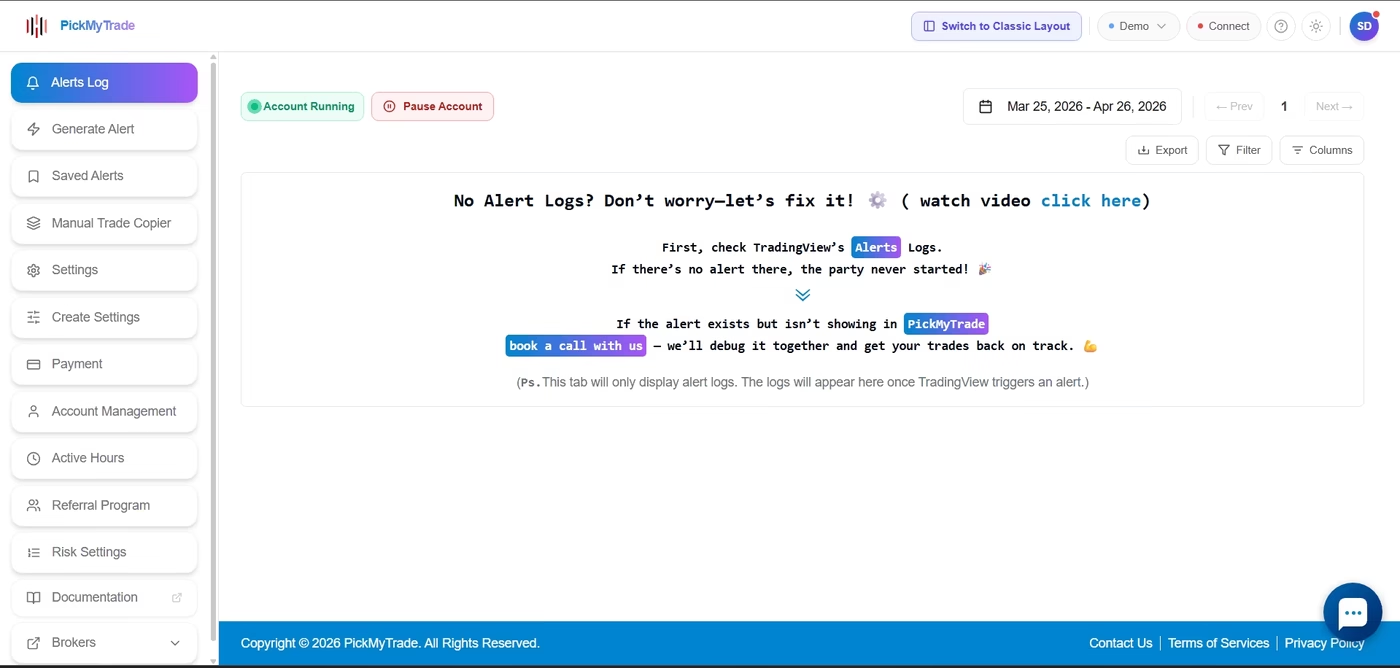
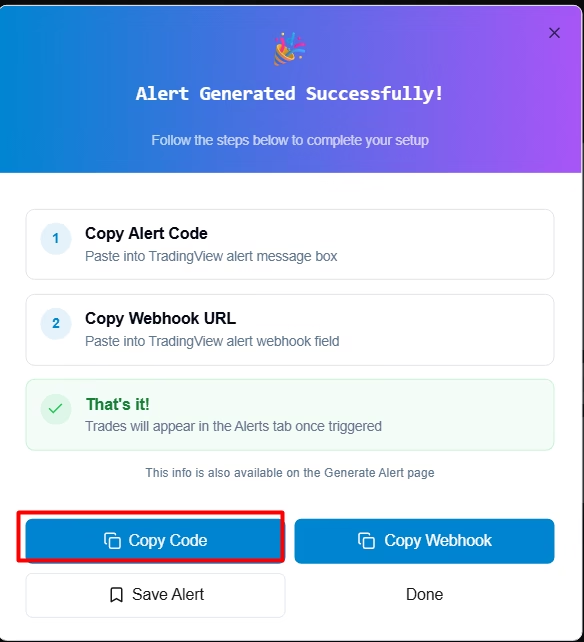
This is a documented way to test the TradingView-to-PickMyTrade-to-Tradovate execution path. Adding Jev remains a separate integration project, described below. Demo setup, TradingView automation instructions
For a fuller walk-through, see our guides to paper trading a TradingView strategy on Tradovate and the Tradovate demo account’s limits and expiry. Our TradingView webhook alert field reference lists every alert field and which TradingView plans support webhooks.
Include commissions, spreads, and realistic execution assumptions. Slippage is the difference between the price expected and the price actually obtained. Avoid assuming that a signal can always fill at the price visible when the decision process began.
Step 7: Evaluate on data you did not tune against
Freeze the configuration, then test on a later period. Compare net results after costs, trade count, average gain and loss, and maximum drawdown—the largest fall from an account-value peak to a subsequent low.
Also review incorrect interpretations, rejected orders, duplicate signals, outages, and position mismatches. A profitable-looking simulation with broken execution accounting is not reliable evidence.
Treat paper results as evidence about that particular setup and period. They do not guarantee future live performance. Our walk-forward optimization guide explains one way to test on data a strategy has not seen, and the scorecard in our Tradovate demo test plan shows what to check before funding an account.
Where Does PickMyTrade Fit?
In a proposed automated workflow, Jev would be the judgment layer: it evaluates supplied context and returns a structured answer. PickMyTrade would be the execution layer: its documented TradingView workflow receives configured alerts and routes the resulting orders to Tradovate. Use the demo account to test simulated order handling first. PickMyTrade’s Tradovate automation guide
What does the proposed architecture look like?
The documented workflow runs from a TradingView alert to PickMyTrade to a Tradovate demo account. A possible Jev extension adds a signal source, a custom application, Jev, and fixed rules and risk controls before any order reaches PickMyTrade, with the Tradovate demo account as the first destination:
This extension is a proposed architecture. A native Jev–PickMyTrade connector was not verified in the documentation reviewed. A developer would need to establish whether the intended custom sender, authentication, payload, account, and broker workflow are supported before implementing the final connection.
Do not forward Jev’s response directly as an order. The application must translate an approved decision into the execution service’s required format. Generate the alert payload and copy the webhook URL from the Tradovate version of PickMyTrade. PickMyTrade automation instructions
How do webhook limits and duplicate alerts affect a custom receiver?
For a TradingView-based custom receiver, account for its three-second webhook processing limit. A proposed design should acknowledge a safely recorded alert promptly, process it separately, reject expired decisions, and prevent duplicate orders. TradingView also documents webhook resends under certain server errors. Webhook configuration, Webhook resubmission. Our explainers on the 3-second TradingView webhook limit and on duplicate webhook alerts cover both problems in more detail.
Test the Tradovate demo connection independently of Jev before evaluating any custom decision layer. This makes it easier to distinguish interpretation errors from alert configuration or execution errors.
Frequently Asked Questions
Send Jev a clear state and a question with specific allowed answers, then let your own code decide what to do with the result. Start in the TypeSafe Playground, check its interpretations on a small evaluation set, and paper-trade a fixed strategy with and without a Jev filter before considering live execution.
The documented TypeSafe evaluation API is not a market-data feed. Your application supplies the state it evaluates. Obtain prices, candles, news, and account information from appropriate sources, and preserve their timestamps.
You can design a question about a future price event, but asking it does not establish forecasting skill. The primary sources reviewed do not demonstrate a reliable, independently validated trading edge. Test any forecasting application separately from request interpretation.
No. Confidence measures how concentrated the model’s answer distribution is. Even a probability attached to a price-direction option would require validation against precisely defined outcomes on unseen trading data before treating it as a useful forecast.
A custom application could receive a TradingView webhook, prepare the state, and call Jev. That is a proposed integration, not a verified native connection. TradingView sends alert data using HTTP POST requests; the receiving application must implement the remaining workflow.
As reviewed on September 23, 2026, TypeSafe lists Jev at $0.042 per million input tokens, with output tokens free. Tokens are the units used to measure model input and output. This is model pricing, not the total cost of market data, hosting, execution services, or brokerage. Check the current price and any gateway-specific terms before running a large experiment.
No. A valid answer format can still contain the wrong decision. TypeSafe documents issues involving numbers, dates, literal interpretation, irrelevant context, and adversarial content. Keep calculations and enforceable limits in code, and test the model on realistic mistakes and edge cases.
No general conclusion follows from an early demo. One developer reported losses in a short simulated futures experiment, including substantial costs. That is a firsthand, self-reported result, not an independently audited assessment of Jev’s overall trading ability.
Sources for these answers: State documentation, Confidence documentation, TypeSafe model pricing, Jev 1.13 limitations, TradingView webhooks and the developer’s experiment report.
The Short Version
To use Jev AI in trading, treat it as an interpreter rather than an oracle. It returns structured answers that your code can act on, but a well-formed answer is not a correct trading judgment. TypeSafe’s recorded NVDA–SPY example shows a request being interpreted, not a trade being predicted.
Start with the recorded research-assistant example and verify your own interpretations. For futures execution testing, follow the Tradovate demo setup guide and automate the simulation account through PickMyTrade before considering live trading.
PickMyTrade connects to a Tradovate demo account the same way it connects to a live one, so the alert you test is the alert you would later fund. Start with the TradingView automation guide.
Disclaimer:
This content is for informational purposes only and does not constitute financial, investment, or trading advice. Trading and investing in financial markets involve risk, and it is possible to lose some or all of your capital. Always perform your own research and consult with a licensed financial advisor before making any trading decisions. The mention of any proprietary trading firms, brokers, does not constitute an endorsement or partnership. Ensure you understand all terms, conditions, and compliance requirements of the firms and platforms you use.
Also Checkout: Automate TradingView Indicators with Tradovate Using PickMyTrade






