
This walkthrough follows a custom stock-scanner application the presenter connects to Interactive Brokers Trader Workstation (TWS). The order examples use an IBKR paper-trading account. The presenter offers the application separately at the end of the video.
How the custom scanner works
The example combines the scanner in TWS with a locally configured application. The scanner finds stocks that meet the chosen criteria. The application checks additional conditions before sending an order to TWS.
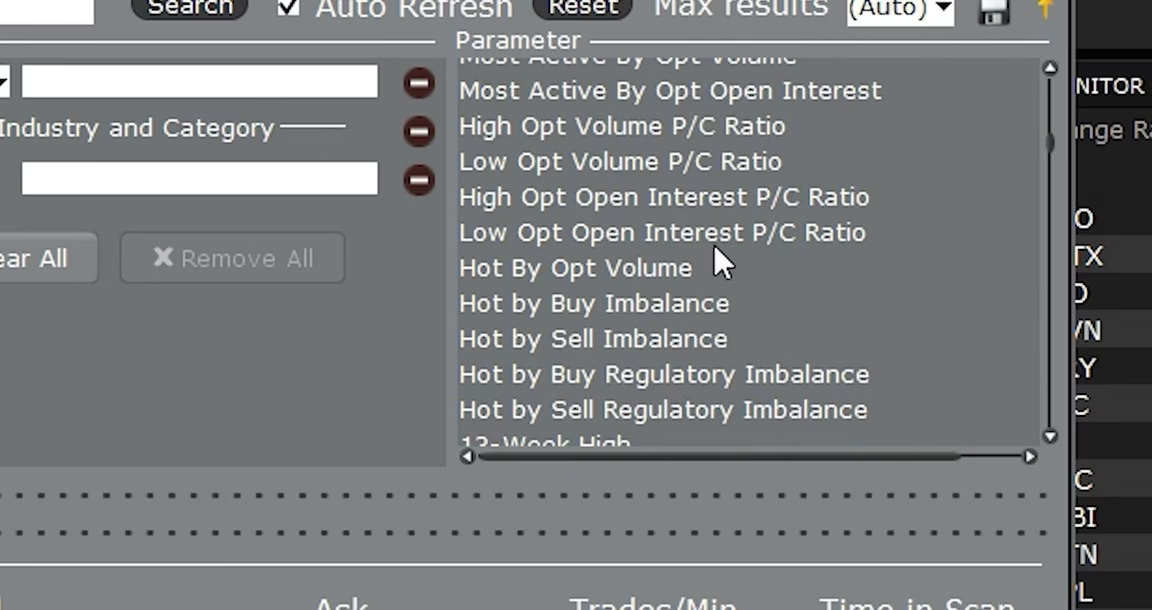
Setting Up Your Scanner
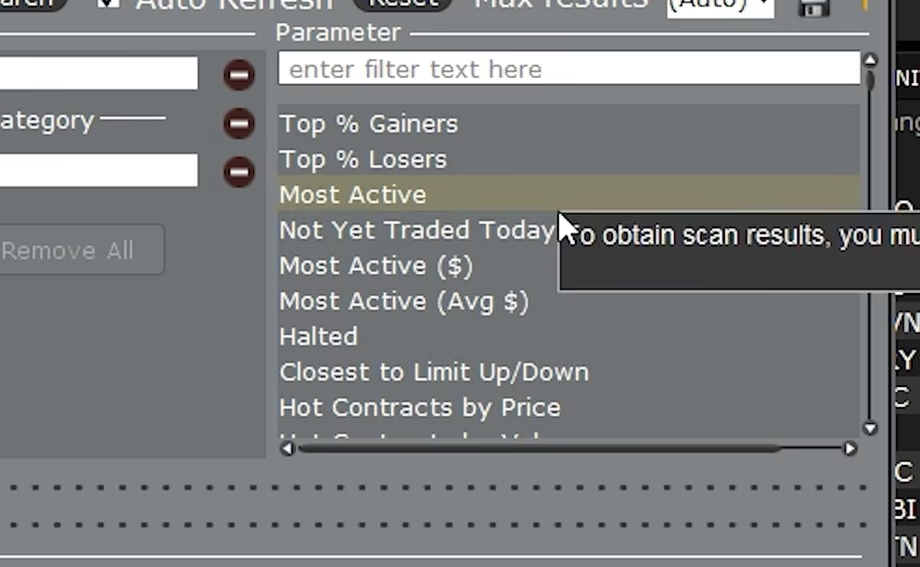
Open the scanner in Trader Workstation and choose the market and scan type. The recording shows options including:
- Top Percentage Gainers
- Top Percentage Losers
- Most Active Stocks
Once you have chosen the scanner, you can input your conditions. For instance, you might want to set filters such as price ranges or volume thresholds. The flexibility of the tool allows you to customize these parameters based on your trading needs.
Creating Custom Conditions
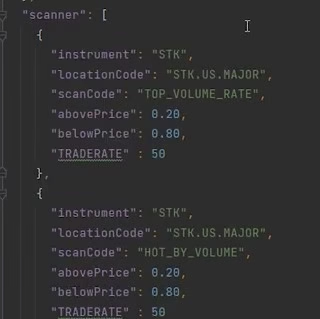
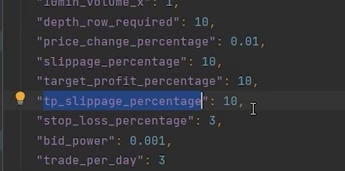
The demonstrated application applies additional filters after the TWS scan returns results. Its configuration includes conditions such as:
- Price should be within a certain range
- Volume should exceed a particular threshold
- Price should be above or below moving averages
This level of customization ensures that you can tailor your trading approach to fit your unique strategy. For example, you can set conditions that require a stock to be above its nine-day moving average or to have experienced a specific percentage change in a given time frame.
Executing Trades Automatically
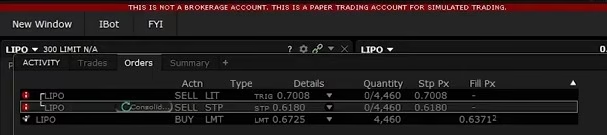
When a candidate meets its configured conditions, the demonstration application sends an order to the paper-trading account. The example includes the following exits:
- Take profit levels
- Stop loss orders
A submitted order can remain open or receive a partial fill. Check its status and the attached exits in TWS.
Working in Different Market Conditions
The presenter discusses how the custom application handles pre-market trading. The example sets a price offset for limit orders when liquidity is thin. An offset does not guarantee a fill.
Moreover, you can specify the maximum number of trades you want to execute in a day, as well as the dollar amount for each trade, which helps in managing your risk effectively.
Monitoring Your Trades
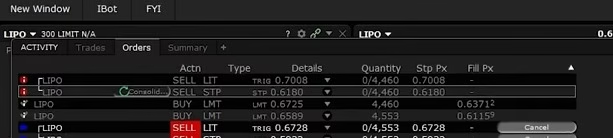
The TWS Orders panel shows the order type, size, status and fills. Use it to distinguish a working exit from a filled entry in the paper-trading demonstration.
Review open orders and partial fills before changing the scanner rules.
Customization and Support
At the end of the recording, the presenter explains that traders can request a copy or discuss custom development. Confirm current availability and platform requirements before relying on this workflow.
Describe the desired scan type, market session and order conditions when discussing a custom implementation.
Watch the presenter discuss scanner customization at 3:09.
Frequently Asked Questions (FAQ)
1. How does PickMyTrade integrate with Interactive Brokers?
The application shown uses the IBKR scanner and routes its demonstration orders through TWS. For the current PickMyTrade IBKR connection, see the Interactive Brokers setup guide.
2. Does the demonstration cover pre-market trading?
The presenter describes pre-market and post-market operation for this custom scanner. Check the instrument, order type and session permissions in your IBKR account.
3. What conditions does the scanner example check?
The example combines price ranges, volume and trade-rate filters with a moving-average condition.
4. Is there support available for customizing the tool?
The presenter invites requests about custom development at the end of the source video.
5. How can I get started with PickMyTrade?
To get started with PickMyTrade, visit their website at PickMyTrade, where you can find more information and resources to enhance your trading journey.
Conclusion
The demonstration shows how to move from IBKR scanner criteria to a paper order and check its status in TWS. Test your own conditions in a paper account and verify current broker requirements before using them live.







Just wish to say your article is as amazing.
The clarity in your post is simply great and i can assume you are an expert on this
subject. Fine with your permission allow me to grab your feed
to keep updated with forthcoming post. Thanks
a million and please continue the enjoyable work.
website
Definitely believe that which you said. Your favorite justification seemed to be on the internet the simplest thing to be aware of.
I say to you, I definitely get annoyed while people consider
worries that they plainly don’t know about. You managed to hit
the nail upon the top as well as defined out the whole thing without
having side-effects , people can take a signal. Will probably be back to get more.
Thanks
casino en ligne
Wow that was odd. I just wrote an very long comment but after I clicked submit my comment didn’t show up.
Grrrr… well I’m not writing all that over again. Anyways, just wanted to
say fantastic blog!
casino en ligne
If some one wishes to be updated with latest technologies therefore he must be
visit this site and be up to date all the time.
casino en ligne
I was wondering if you ever thought of changing the structure of your site?
Its very well written; I love what youve got to say.
But maybe you could a little more in the way of content so people could connect with it better.
Youve got an awful lot of text for only having 1 or two pictures.
Maybe you could space it out better?
casino en ligne
I am curious to find out what blog platform you are using?
I’m having some small security problems with my latest site and I’d like to
find something more secure. Do you have any solutions?
casino en ligne
Just wish to say your article is as astounding. The clarity in your post
is simply nice and i could assume you’re an expert on this subject.
Fine with your permission allow me to grab your RSS feed to keep updated with forthcoming post.
Thanks a million and please continue the rewarding work.
casino en ligne
Wow, incredible blog layout! How long have you been blogging for?
you made blogging look easy. The overall look of your website is excellent,
let alone the content!
casino en ligne
If you wish for to take much from this post then you have to apply these strategies to
your won web site.
casino en ligne
Remarkable! Its truly amazing article, I have got much clear idea regarding from this
paragraph.
casino en ligne