
Passing a prop firm challenge does not always make the next account immediately tradable. Confirm the pass, complete the required identity and agreement steps, pay an activation fee only if your plan requires one, and verify the newly issued account before sending orders. The evaluation screen and the funded-stage account are separate checkpoints.
Table of Contents
- 1. Confirm a recorded pass, not just a target balance
- 2. Find the first incomplete activation step
- 3. Read the deadline and the clock’s starting point
- 4. Verify the activation path before paying
- 5. Read the new account as a new ruleset
- 6. Verify access without using a live order as a test
- When to contact support
- Frequently asked questions
- Can I keep trading the passed evaluation?
- Do evaluation profits become withdrawable profits?
- Does an activation fee mean the account is ready?
- What if no activation prompt appears?
If your dashboard says “passed” but your platform still lists only the evaluation, start with the firm’s activation screen. A missing signature needs a different fix from a new account ID that hasn’t appeared on the platform.
The examples below were checked on November 12, 2026. At Topstep, for example, the Express Funded Account is a simulated funded stage; the Live Funded Account is a separate stage.
1. Confirm a recorded pass, not just a target balance
Start in the firm’s dashboard. Look for an explicit pass status tied to the correct account ID. Reaching a profit target on a trading platform is only one piece of evidence; the firm may need to finish its evaluation checks before changing the account state.
Capture the final dashboard and the time it changed. If you traded several evaluations, note which one passed. Keep a separate record for each account so that an activation prompt for one does not get mistaken for approval of another.
Topstep’s Trading Combine guidance explains that pass processing can take up to 30 minutes and that evaluation profits do not transfer into the Express Funded Account. Its page also describes a different availability window for accounts passed on Friday. Use the current instructions for the actual pass date. Topstep Trading Combine parameters.
While status is unresolved, another trade is not a way to accelerate processing. Check whether the firm has already disabled the passed evaluation and wait for the next required action.
2. Find the first incomplete activation step
Treat activation as a sequence with an observable result at each stage:
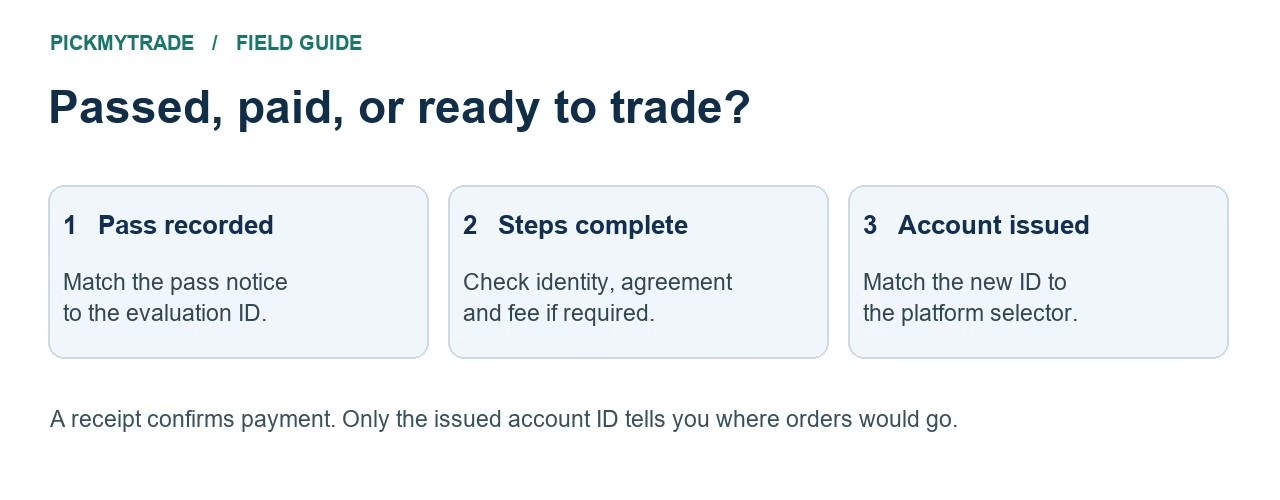
Recorded pass → identity requirements completed → agreement accepted → applicable payment completed → new account issued → access verified.
The order and required steps vary. Your dashboard and current program documentation decide which steps apply. A paid receipt does not prove that identity verification is complete, and an accepted identity check does not prove the new trading account has been issued.
| Checkpoint | Evidence to save | What remains unresolved without it |
|---|---|---|
| Pass accepted | Account-specific status or confirmation | Whether activation is available |
| Identity check completed | Verification status | Whether the agreement can proceed |
| Agreement accepted | Confirmation or downloadable agreement | Whether contractual setup is complete |
| Applicable fee processed | Receipt and account reference | Whether payment reached the intended activation |
| New account issued | New account identifier | Which account should receive orders |
| Platform access working | Correct account visible in the intended environment | Whether you can safely verify its settings |
Do not upload identity documents into public Discord channels to demonstrate that you completed a step. Keep those within the firm’s designated verification process.
3. Read the deadline and the clock’s starting point
Alpha Futures gives traders 30 days after passing to sign the contract; KYC approval is a prerequisite to signing. Its activation guide states that the Qualified Account is issued within 24 hours after those steps are completed. The deadline to act and the processing period after completion are different clocks. Alpha Futures Qualified Account activation.
A practical tracking note should therefore include three timestamps: when the evaluation passed, when your last required step completed, and when the firm acknowledged completion. If a page says processing begins after all requirements, timing from the final trade gives you the wrong elapsed period.
Where a requirement is ambiguous, ask support to identify the missing step. For example: “The account passed at [time], verification shows [status], and the agreement shows [status]. Which requirement is still preventing account issuance?”
This is more actionable than asking only whether the firm is slow. It also prevents a series of duplicate payment attempts when the actual blocker is an unsigned agreement.
4. Verify the activation path before paying
An activation charge is not universal. Topstep’s activation instructions distinguish the Standard purchase path, which has an activation fee, from the No Activation Fee path. The flow includes selecting the passed account, reviewing the relevant account choices and agreement, and paying when applicable. Topstep Express Funded Account activation.
Before confirming a payment, match the checkout to your original purchase receipt. Check the account size, program, path, currency, amount, and whether you are activating an existing pass or purchasing something new. A similarly named product card can lead to the wrong transaction.
If the page presents a choice of funded-account paths, compare the actual rules rather than choosing from the names alone. Write down the payout structure, restrictions, and any conditions you would need to follow. Do not assume a choice can be changed later.
Keep the final confirmation. If the checkout fails or remains pending, check the transaction status before trying again. A screenshot of an error and a payment reference gives support more useful information than several attempted charges.
5. Read the new account as a new ruleset
Do not copy every evaluation setting into the next account without checking it. Build a one-page account card from the rules for the new stage:
| Field | Record for the newly issued account |
|---|---|
| Account identifier | Exact ID, not a nickname |
| Account stage | Firm’s precise stage label |
| Displayed starting balance | Actual dashboard value |
| Loss controls | Applicable limits and their calculation basis |
| Contract allowance | Current tier, not a marketing maximum |
| Session cutoff | Firm and instrument-specific requirements |
| Payout conditions | Current program and cohort |
| Subscription status | Which evaluation charges have ended |
Topstep’s Express Funded Account parameters, for example, describe stage-specific account limits and conditions. They should be checked separately from the Trading Combine rules. Topstep Express Funded Account parameters.
The account card is your own operational checklist. It is useful precisely because the values are taken from your account, rather than from somebody else’s screenshot or a remembered rule from the evaluation.
6. Verify access without using a live order as a test
Open the intended trading platform and confirm the account identifier, account environment, connection, and displayed permissions. If multiple accounts are listed, identify the one the firm just issued before changing any routing or automation settings.
Check the order ticket’s default account and quantity. Review any saved workspace that may still point to the passed evaluation. A chart appearing normally is not proof that its order-entry panel is connected to the new account.
For automated workflows, keep entries disabled until the account selection and applicable settings are checked. A small live order still creates a real account event; it is not a substitute for reading the account selector. Use an appropriate simulation environment for workflow tests when one is available and clearly distinguish it from the issued account.
Once you have the new ID and have confirmed the firm permits your setup, follow how to update your automation route after a funded account change.
When to contact support
Escalate when a required step shows an error, the published processing window has passed after completion, or the newly issued account has details that conflict with your confirmation.
Provide a compact timeline: account ID, pass time, identity status, agreement status, payment reference if applicable, and the current dashboard message. State the timezone. Attach cropped screenshots without identity-document images, passwords, or full payment details.
Ask for the next action and the account’s current state. That helps distinguish “verification still pending” from “account issued but platform access missing,” which need different resolutions.
Frequently asked questions
Can I keep trading the passed evaluation?
Follow the firm’s account status and pass instructions. Do not assume that further trades improve the result or carry into the next account. Confirm the transition before attempting another order.
Do evaluation profits become withdrawable profits?
Do not assume they transfer. Check the new stage’s starting balance and payout rules. A passed evaluation and withdrawable funded-stage profit are different records.
Does an activation fee mean the account is ready?
Payment is one checkpoint. Identity verification, agreement acceptance, account creation, and platform access may still need to complete.
What if no activation prompt appears?
Confirm the correct account has a recorded pass, check the dashboard’s required actions, then use the firm’s published timing and support process. Do not purchase a second evaluation simply to make a missing activation prompt appear.