
Introduction: Professional Order Flow Analysis for Retail Traders
Order flow trading has long been the domain of institutional traders with access to expensive platforms and real-time tick data. But what if you could approximate these powerful concepts using publicly available volume data on TradingView?
Table of Contents
- Introduction: Professional Order Flow Analysis for Retail Traders
- Fabio Valentini 1-minute scalping: rules and settings at a glance
- Who Is Fabio Valentini?
- Fabio Valentini’s Trading Rules (From Public Interviews)
- What Is Order Flow Trading?
- Understanding Market Microstructure
- The Retail Limitation
- Core Methodology: How the Strategy Works
- 1. Volume Profile: Identifying Institutional Interest
- 2. Delta Approximation: Who’s in Control?
- 3. Absorption Detection: Institutional Footprints
- 4. The Triple-A Framework: Absorption, Accumulation, and Aggressive Expansion
- Entry Signal Types
- 1. Triple-A Setups (Highest Quality)
- 2. Opening Range Breakout (ORB)
- 3. Value Area Bounces
- VWAP Integration
- Risk Management Rules
- Fixed Risk Per Trade
- Risk-Reward Ratio
- Three-Loss Daily Stop
- Optional Trailing Stops
- Strategy Optimization
- Best Markets
- Recommended Timeframes
- Backtesting Guidelines
- Automation with PickMyTrade
- Automation Flow
- Supported Brokers and Platforms
- Correct TradingView Webhook Payload
- Indicators & Settings Quick Reference
- Fabio Valentini 1-Minute Scalping Strategy Rules (Script Implementation)
- FAQ
- Final Thoughts
- Ready to Automate?
- Get Started in 3 Steps
- Disclaimer
- You may also like:
The Fabio Valentini Pro Scalper strategy brings institutional-grade order flow analysis to retail traders, inspired by professional NASDAQ scalper Fabio Valentini’s methodology. This strategy combines volume profile analysis, absorption detection, and the Triple-A setup to identify high-probability scalping opportunities in liquid markets.
In this comprehensive guide, you’ll learn:
- What order flow trading really means
- How institutional concepts are approximated on TradingView
- Why the Triple-A setup works
- How to configure and optimize the strategy
- How to automate execution with PickMyTrade
Fabio Valentini is not affiliated with PickMyTrade. This guide summarizes his approach from public interviews, his published World Cup results, and his own descriptions, and explains how our open-source TradingView script approximates it.
Fabio Valentini 1-minute scalping: rules and settings at a glance
| Item | Setting / rule |
|---|---|
| Instrument | NQ (Nasdaq futures); Valentini trades one instrument at a time |
| Session | New York session; filter entries to the New York session window and treat signals outside it as noise |
| Timeframe | 1-minute NQ chart for signals; 5-minute chart for balance/imbalance context |
| Entry setups | Triple-A (absorption, accumulation, volume breakout), Opening Range Breakout (30-minute window), Value Area bounces at VAH/VAL |
| Volume profile | 50-bar lookback, 24 price-level rows (POC, VAH, VAL) |
| Delta smoothing | 5 bars |
| Absorption filter | Volume above 2.0x average volume and candle range below 0.3 x ATR |
| VWAP | Above VWAP = bullish bias, below VWAP = bearish bias; bands at 0.5 ATR |
| Stop loss | ATR-based stop; optional trailing stop at 1.5 ATR |
| Take profit | 2:1 reward-to-risk (2.0), calculated automatically |
| Risk per trade | Script default 1% of account; Valentini describes roughly 0.25% per trade |
| Daily stop | Stop trading after 3 losing trades in a day |
Want these entries placed automatically? PickMyTrade sends your TradingView alerts to Tradovate.
Who Is Fabio Valentini?
Fabio Valentini is an Italian futures scalper based in the UAE who trades Nasdaq futures (NQ) primarily during the New York session, one instrument at a time. In public interviews he describes his strategy as auction market theory combined with order flow: reading balance versus imbalance in the market, then working through a three-step process he calls Direction, Location, and Aggression. His tools are order-flow instruments rather than lagging oscillators — volume profile, VWAP, footprint charts, and cumulative volume delta (CVD). He has recorded top-three audited finishes in the Robbins World Cup Trading Championships in the futures division, with reported returns including a 218% quarter, and teaches an order-flow masterclass. He is known from a widely-viewed interview titled “Trading LIVE with the #1 Scalper in the World.”
Fabio Valentini’s Trading Rules (From Public Interviews)
As described by Valentini in interviews — not trading advice:
- Trade one market (NQ) in one session (New York open)
- Classify the day: balance vs imbalance (auction market theory)
- Direction — establish which side is in control via CVD/delta
- Location — wait for price at a key level (POC, value-area edge, LVN)
- Aggression — enter only on visible aggressive order flow at that level
- Risk roughly 0.25% per trade, minimum 2:1 reward-to-risk
- Hard stop after 3 losses in a day
- Scale risk up only with the day’s profits, never base capital
What Is Order Flow Trading?
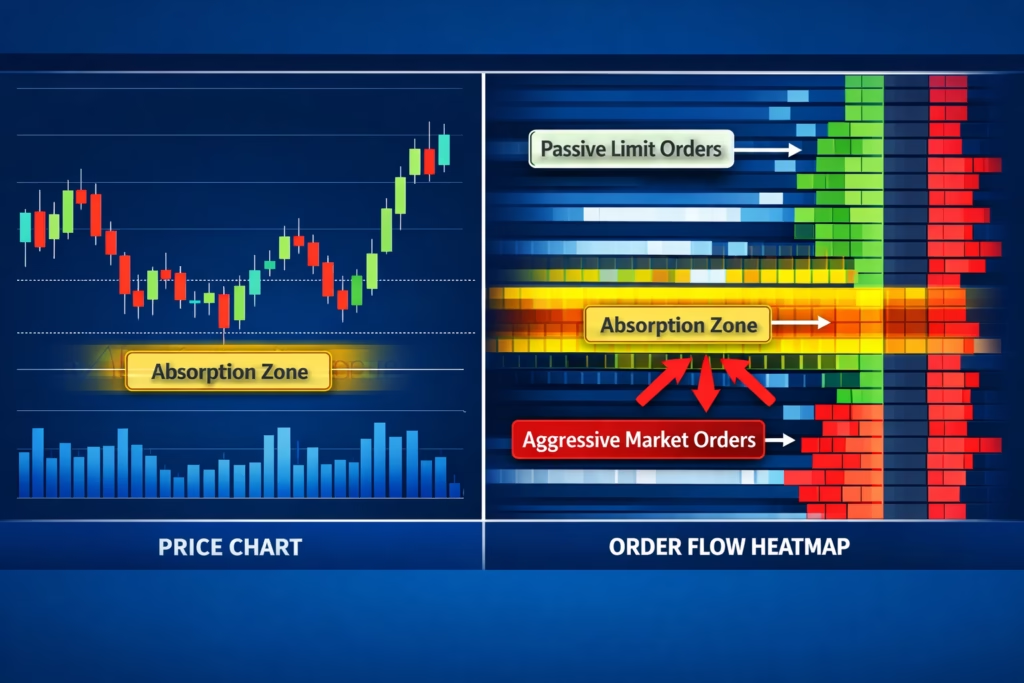
Understanding Market Microstructure
Order flow trading analyzes the actual buying and selling pressure by observing how orders interact at the bid and ask. Unlike traditional technical analysis, order flow focuses on:
- Who controls the market (buyers vs sellers)
- Where institutions accumulate positions
- When aggressive directional moves are likely
Professional traders use tools like Sierra Chart or Investor/RT with exchange feeds to see:
- Passive limit orders
- Aggressive market orders
- Absorption of order flow
- Stacked imbalances
The Retail Limitation
Most retail platforms, including TradingView, don’t provide true tick-by-tick bid/ask data. Instead, traders see OHLC candles and aggregated volume.
The workaround: The Fabio Valentini Pro Scalper approximates order flow using advanced volume analysis:
- Delta approximation for buyer/seller pressure
- Volume profile for institutional zones
- Absorption detection via high-volume, low-range candles
- Triple-A sequencing to track institutional behavior
This captures the essence of order flow using accessible data.
Core Methodology: How the Strategy Works
1. Volume Profile: Identifying Institutional Interest
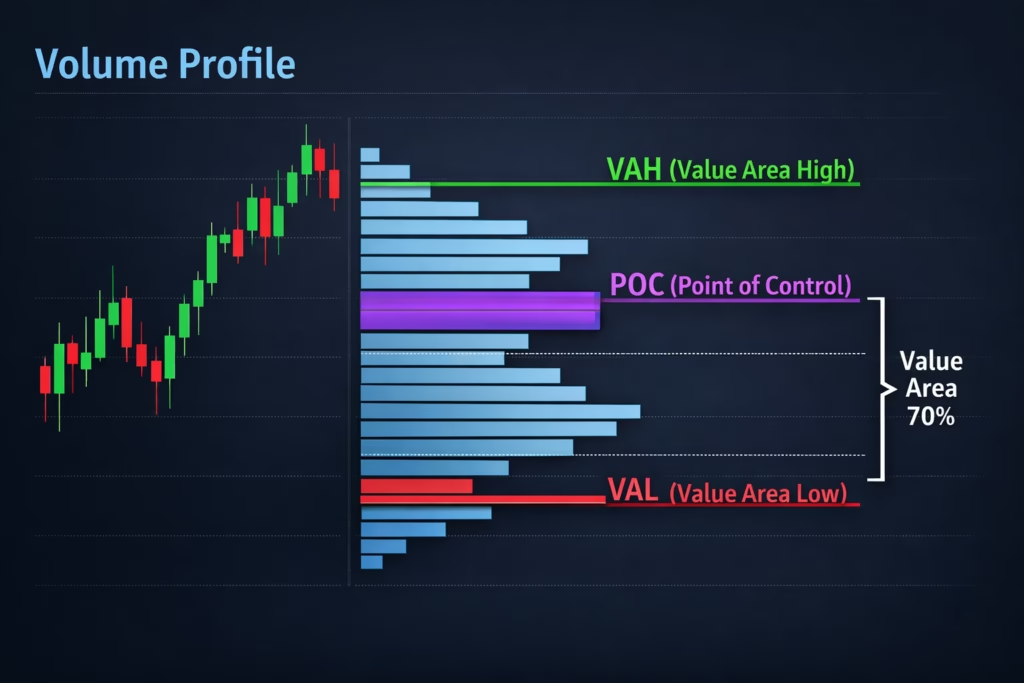
Volume profile reveals where trading activity concentrates at specific price levels.
- POC (Point of Control): Highest traded volume
- VAH / VAL: Range containing ~70% of volume
Institutions accumulate at perceived value. When price revisits these zones, reactions often occur.
Default configuration:
- Lookback: 50 bars
- Resolution: 24 price levels
2. Delta Approximation: Who’s in Control?
Delta estimates the balance between aggressive buyers and sellers.
- Bullish candle + volume near highs → buying pressure
- Bearish candle + volume near lows → selling pressure
- Smoothed over multiple bars to reduce noise
Delta helps confirm trend strength and spot divergence.
3. Absorption Detection: Institutional Footprints
Absorption occurs when large passive orders absorb aggressive market flow.
Characteristics:
- Volume spikes
- Tight candle ranges
- Often at key levels
Detection logic:
Volume > Average Volume × 2.0
AND
Candle Range < ATR × 0.3
This identifies where institutions quietly build positions.
4. The Triple-A Framework: Absorption, Accumulation, and Aggressive Expansion
This pattern reflects the full institutional trade lifecycle:
- Absorption: High volume, little movement
- Accumulation: Tight consolidation
- Aggression: Breakout with volume
Only when all three phases align does the strategy trigger its highest-conviction signals.
Entry Signal Types
1. Triple-A Setups (Highest Quality)
- Absorption detected
- Accumulation confirmed
- Breakout with volume
- Optional VWAP filter
Best for quality-focused scalpers.
2. Opening Range Breakout (ORB)
- Break above/below first session range
- Volume confirmation
- Optional VWAP alignment
Ideal for early-session momentum.
3. Value Area Bounces
- Price reacts at VAH or VAL
- Absorption confirms defense
- Reversal structure
Used for mean-reversion setups.
VWAP Integration
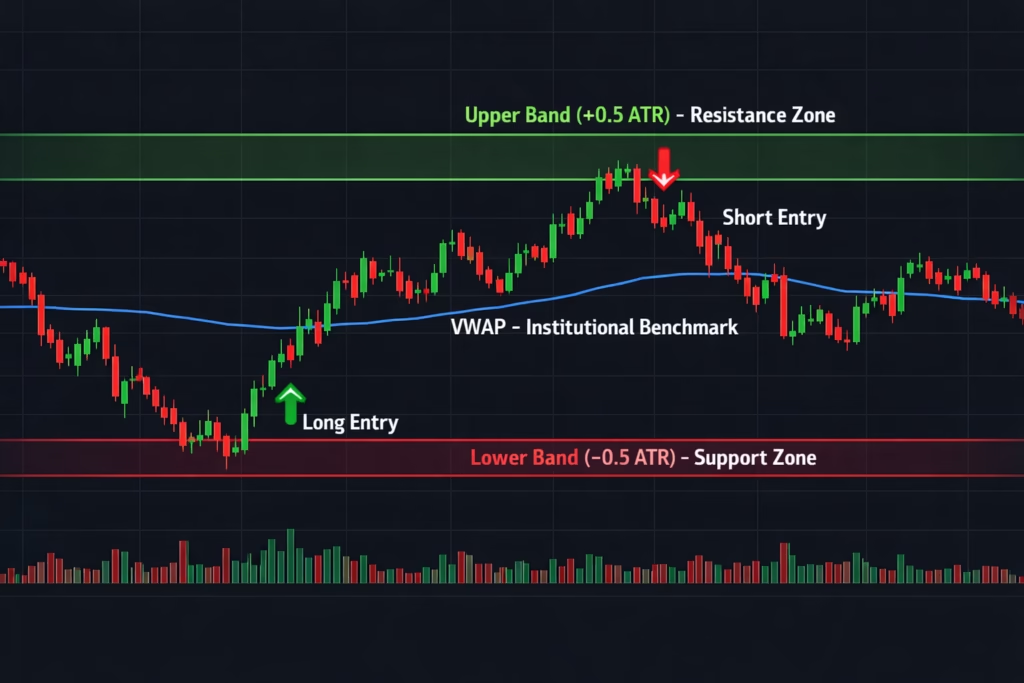
VWAP represents the institutional benchmark price.
Strategy usage:
- Above VWAP → bullish bias
- Below VWAP → bearish bias
- ATR-based VWAP bands identify extensions
VWAP filters improve trade alignment and consistency.
Risk Management Rules
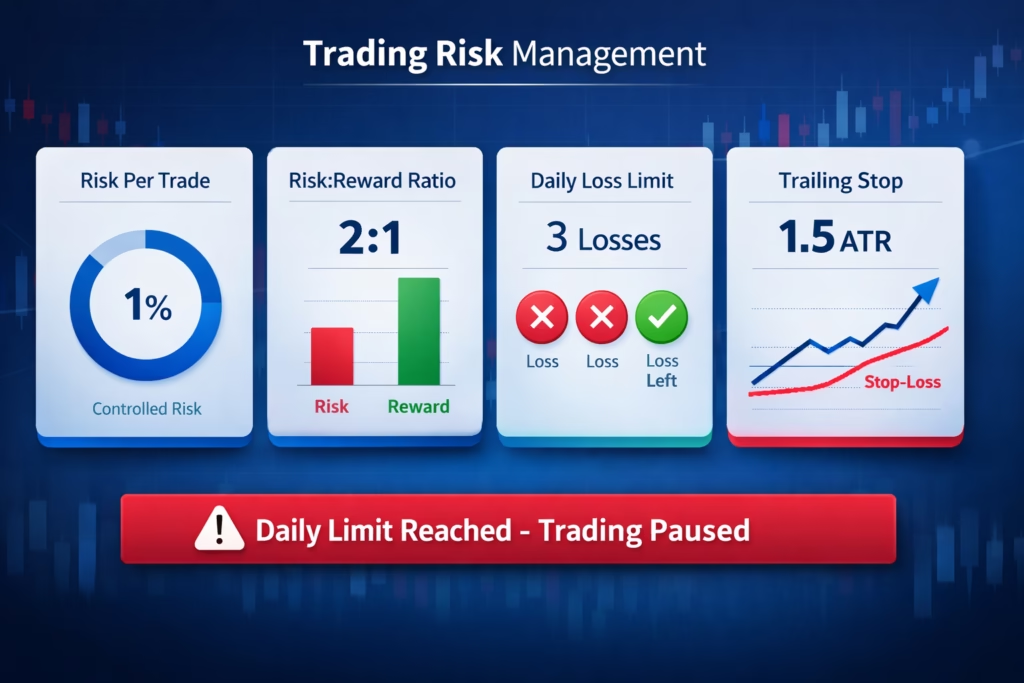
Fixed Risk Per Trade
- Default: 1% of account
- ATR-based stop calculation
- Position sizing adjusts automatically
Risk-Reward Ratio
- Default: 2:1
- Strategy auto-calculates take profit
Three-Loss Daily Stop
After three losing trades, signals stop for the day.
This rule:
- Prevents revenge trading
- Protects capital
- Enforces discipline
Optional Trailing Stops
- Default: 1.5 ATR
- Locks profits during favorable moves
Strategy Optimization
Best Markets
- NASDAQ Futures (NQ, MNQ)
- ES Futures
- BTC / ETH
- Liquid large-cap stocks
Avoid illiquid instruments and wide spreads.
Recommended Timeframes
- 5-minute: Learning and stability
- 2-minute: Balanced scalping
- 1-minute: Advanced execution
Backtesting Guidelines
- Use realistic commissions and slippage
- Test one variable at a time
- Minimum 3–6 months of data
- Validate out-of-sample
- Avoid extreme parameter values
Automation with PickMyTrade
Manual scalping often suffers from latency, emotional decision-making, and execution inconsistency. PickMyTrade eliminates these weaknesses by providing professional-grade trade automation directly from TradingView.
Key advantages include:
- Millisecond execution to capture fast-moving scalping targets
- Emotion-free trading by strictly following predefined strategy logic
- 24/7 automation via cloud infrastructure or VPS integrations
- Broker-level risk management, including automated stop loss and take profit handling
By automating execution, traders can focus on strategy development and performance analysis instead of manual clicking and emotional reactions.
Automation Flow
PickMyTrade follows a streamlined and reliable path from chart signal to broker execution:
- A TradingView strategy or indicator triggers a signal based on market conditions
- TradingView sends a webhook alert instantly to PickMyTrade’s servers
- The signal is validated against your account rules and broker-specific mapping
- The trade is executed on your connected broker account
- Stop loss and take profit levels are managed automatically according to your configuration
Supported Brokers and Platforms
PickMyTrade currently supports execution across major retail, futures, crypto, and prop-firm environments, including:
- Tradovate
- Interactive Brokers (IBKR)
- TradeStation
- Rithmic
- TradeLocker
- ProjectX (TopstepX and other supported prop firms)
This allows traders to automate the same strategy across multiple brokers from a single dashboard.
Correct TradingView Webhook Payload
PickMyTrade requires a specific JSON structure to correctly parse and route orders to the broker.
Below is the standard strategy payload used for automation:
 {
    "symbol": "MNQ1!",
    "date": "{{timenow}}",
    "data": "buy",
    "quantity": 1,
    "risk_percentage": 0,
    "price": "{{close}}",
    "tp":  {{plot("Upper")}},
    "percentage_tp": 0,
    "dollar_tp": 10,
    "sl":  {{plot("lower")}},
    "dollar_sl": 5,
    "percentage_sl": 0,
    "update_tp": false,
    "update_sl": false,
    "token": "******3",
    "duplicate_position_allow": true,
    "platform": "PROJECTX",
    "order_type": "MKT",
    "inst_type": "FUT",
    "place_order_at": "away_strike",
    "pyramid": false,
    "reverse_order_close": true,
    "trail": 0,
    "multiple_accounts": [
        {
            "token": "******3",
            "connection_name": "PROJECTX1",
            "account_id": "******88",
            "risk_percentage": 0,
            "quantity_multiplier": 1
        }
    ]
}
Important Notes:
- Use the
slandtpkeys for price-based stop loss and take profit levels - Always include your Unique Token for authentication
reverse_order_close: trueensures position reversal logic is handled correctly when switching direction
Indicators & Settings Quick Reference
Valentini himself trades with order-flow platforms: volume profile (POC/VAH/VAL), VWAP, footprint charts, and cumulative volume delta (CVD). Footprint charts and CVD typically require a dedicated order-flow data feed — on TradingView, our free script below approximates them using volume-based calculations.
Fabio Valentini Pro Scalper [PickMyTrade] script defaults (verified from the published script):
| Setting | Default | What it does |
|---|---|---|
| Volume Profile lookback | 50 bars | POC / value-area calculation window |
| Volume profile rows | 24 | Price-level resolution |
| Delta smoothing | 5 bars | Buy/sell-pressure estimate |
| Volume (absorption) multiplier | 2.0 | Flags high-volume/low-movement candles |
| Opening Range Breakout | 30 min | ORB entry window |
| VWAP band width | 0.5 ATR | Dynamic value bands |
| ATR trailing-stop multiplier | 1.5 | Optional trailing exit |
| Risk per trade | 1% (set to taste) | Fixed fractional sizing |
| Risk:Reward | 2.0 | Matches Valentini’s stated 2:1 minimum |
| Max daily losses | 3 | Matches his 3-loss stop |
Fabio Valentini 1-Minute Scalping Strategy Rules (Script Implementation)
Our implementation, inspired by his public methodology: run the script’s Triple-A, ORB, and value-area entries on a 1-minute NQ chart for signals, using the 5-minute chart for context on the broader balance/imbalance read. Filter entries to the New York session window. Treat any signal outside your defined session as noise, and use the max-daily-loss setting to enforce the 3-loss stop automatically.
FAQ
Who is Fabio Valentini?
Fabio Valentini is an Italian futures trader known for scalping Nasdaq futures (NQ) with order flow. He has recorded top-three audited finishes in the Robbins World Cup Trading Championships, including a reported 218% quarter, and teaches order-flow trading based on auction market theory.
What is Fabio Valentini’s trading strategy?
In public interviews he describes a three-step order-flow process — Direction, Location, Aggression: identify which side controls the market with volume delta, wait for price at a key volume-profile level, and enter only when aggressive orders confirm. He trades both trend continuation and mean reversion back to the Point of Control.
What indicators does Fabio Valentini use?
He relies on order-flow tools rather than lagging indicators: volume profile (POC, value area), VWAP, footprint charts, and cumulative volume delta (CVD). On TradingView, our free Fabio Valentini Pro Scalper script approximates these with volume-based calculations.
What are Fabio Valentini’s risk management rules?
As stated in interviews: roughly 0.25% risk per trade, a minimum 2:1 reward-to-risk ratio, and a hard stop after three losing trades in a day. He increases size only with profits already made that session.
Can you automate a Fabio Valentini-style strategy?
Yes — add the free Fabio Valentini Pro Scalper [PickMyTrade] script to a TradingView chart, enable its alerts, and connect the webhook to PickMyTrade to auto-execute on Tradovate, Rithmic, Interactive Brokers, TradeStation, or prop-firm accounts. This strategy is an independent approximation, not endorsed by Valentini.
Related reading: free Fabio Valentini Pro Scalper script on TradingView, Umar Ashraf’s Power of Three strategy, and TradingView to Tradovate trade copier.
Final Thoughts
The Fabio Valentini Pro Scalper strategy demonstrates how institutional trading concepts can be approximated using accessible tools:
- Volume profile to identify value and acceptance zones
- Absorption detection to reveal institutional positioning
- Triple-A sequencing for precision timing
- VWAP alignment for defining daily market bias
- Strict risk rules for long-term account longevity
Automated trading is not a shortcut. Success still depends on realistic cost assumptions, proper optimization, and execution quality.
However, automation with PickMyTrade removes human error and enforces the discipline required to trade consistently.
Ready to Automate?
PickMyTrade connects TradingView strategies directly to real-time broker execution.
Key features:
- ✔ No-code automated execution
- ✔ Advanced risk controls with dynamic SL/TP and multipliers
- ✔ Multi-broker support from a single dashboard
- ✔ Paper trading mode for safe testing
- ✔ Unlimited signals to scale across multiple accounts
Get Started in 3 Steps
- Sign up: https://pickmytrade.io/
- Connect your broker
- Generate your alert JSON and paste it into TradingView
Pricing: Standard plans start from $50/month per connection
Disclaimer
This strategy is for educational purposes only. Past performance does not guarantee future results. Scalping involves substantial risk, and slippage can occur in volatile markets. Always paper trade before deploying real capital. Users are solely responsible for their own trading decisions and configurations.
© 2026 PickMyTrade
You may also like:
Tradovate Prop Firms: The Complete Guide for Using Automation
Top TradingView Automation Mistakes to Avoid in 2026
Building a TradingView Strategy with Claude: The Advanced Pine Script Playbook
How to Use TradingView MCP with Claude AI: Full Setup Guide






