As a retail trader, you’ve spent hours staring at TradingView charts, waiting for the perfect setup. But when the tradingview signals finally appears—whether from a moving average crossover, RSI divergence, or your favorite indicator—life gets in the way. Emotions creep in, hesitation costs you pips, or you miss the move entirely.
What if you could remove all that friction? Enter automated trading with TradingView signals. PickMyTrade bridges your TradingView ideas directly to your broker, executing trades automatically with lightning speed and pinpoint accuracy. Designed specifically for beginners and busy retail traders, PickMyTrade requires zero coding, offers an intuitive setup, and supports multiple assets like futures, stocks, forex, and crypto.
In this guide, you’ll learn practical steps to get started, real-world benefits, and how to trade hands-free while you focus on strategy refinement.
Why Retail Traders and Beginners Love PickMyTrade for TradingView Automation
PickMyTrade stands out by prioritizing ease of use over complexity. Unlike solutions requiring custom scripts, JSON formatting, or VPS management, PickMyTrade handles everything behind the scenes.
Key benefits include:
- Lightning-Fast Execution — Signals trigger trades in milliseconds, capturing opportunities before the market moves against you.
- Unmatched Accuracy — Precise order placement eliminates human error, ensuring your strategy runs exactly as intended.
- Beginner-Friendly Interface — No programming knowledge needed—just connect your broker, generate alerts, and go live.
- Emotion-Free Trading — Automation enforces discipline, removing fear and greed from every decision.
- 24/7 Reliability — Your strategies run continuously, even while you sleep or work.
Retail traders gain freedom: more time for family, learning, or developing new ideas, all while scaling their edge.
How PickMyTrade Works: A Simple, Step-by-Step Breakdown
PickMyTrade turns your TradingView signals into real trades through a seamless workflow:
- Build or choose your strategy/indicator on TradingView (premium).
- Set up alerts based on your conditions (buy, sell, take-profit, stop-loss).
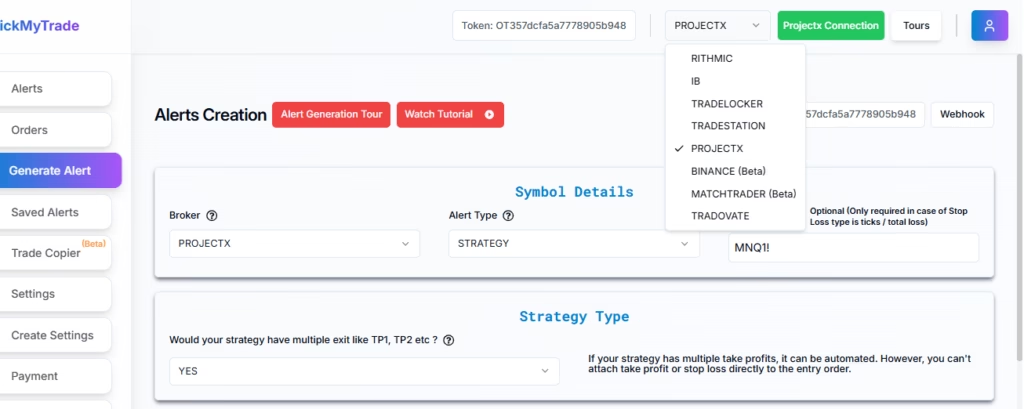
- Connect PickMyTrade to your broker (supports Tradovate, Rithmic, Interactive Brokers, and more).
- Generate ready-to-use alert messages and webhook URLs from PickMyTrade.
- Paste them into TradingView alerts—done!
The system processes signals instantly, applies your risk rules (position sizing, max risk per trade), and executes orders automatically.
Practical tip for beginners: Start with a simple setup like a moving average crossover. Test in simulation mode first to build confidence before going live.
Here are some visual examples of how easy the dashboard and setup look:
Click Here to get a 5- day Free Trial of PickMyTrade – Trading Automation
Real-World Use Cases: How Traders Are Winning with PickMyTrade
- Day Trading Futures — A beginner automates ES (S&P 500 futures) entries on breakout signals, with built-in 1% risk per trade. No more late-night monitoring.
- Swing Trading Forex — Use RSI overbought/oversold alerts for EUR/USD; PickMyTrade handles entries, trailing stops, and exits while you work your day job.
- Multi-Asset Portfolio — Run strategies across stocks and crypto simultaneously, with position sizing adjusted automatically for each account.
- Prop Firm Challenges — Traders use PickMyTrade to pass Apex Trader Funding evaluations by executing consistent, rule-based trades from TradingView signals.
These scenarios show how automation boosts consistency and profitability without technical headaches.
Conclusion: Take Control of Your Trading Future Today
Automated TradingView trading doesn’t have to be complicated or intimidating. With PickMyTrade, beginners and retail traders finally get the speed, accuracy, and ease they’ve been waiting for. Stop missing opportunities, eliminate emotional decisions, and let your strategies work 24/7.
Ready to automate your TradingView signals? Sign up for PickMyTrade today and claim your free trial. Join thousands of traders already trading smarter—not harder.
Frequently Asked Questions (FAQs)
Do I need coding skills to use PickMyTrade?
No! PickMyTrade is 100% no-code. It auto-generates everything you need.
Which brokers does PickMyTrade support?
Popular options include Tradovate, Rithmic, Interactive Brokers, TradeStation, and more—ideal for futures, stocks, and forex.
How fast is the execution?
Trades execute in milliseconds after your TradingView alert fires, minimizing slippage.
What assets can I automate?
Futures, stocks, options, forex, crypto—whatever TradingView supports.
Disclaimer:
This content is for informational purposes only and does not constitute financial, investment, or trading advice. Trading and investing in financial markets involve risk, and it is possible to lose some or all of your capital. Always perform your own research and consult with a licensed financial advisor before making any trading decisions. The mention of any proprietary trading firms, brokers, does not constitute an endorsement or partnership. Ensure you understand all terms, conditions, and compliance requirements of the firms and platforms you use.
Also Checkout: Connect Tradovate with Trading view using PickMyTrade